After creating your ProctorU account, you must schedule your exam session. Scheduling is completed directly through ProctorU.
To begin, visit: https://go.proctoru.com/session/new?target=%2Fstudents%2Freservations
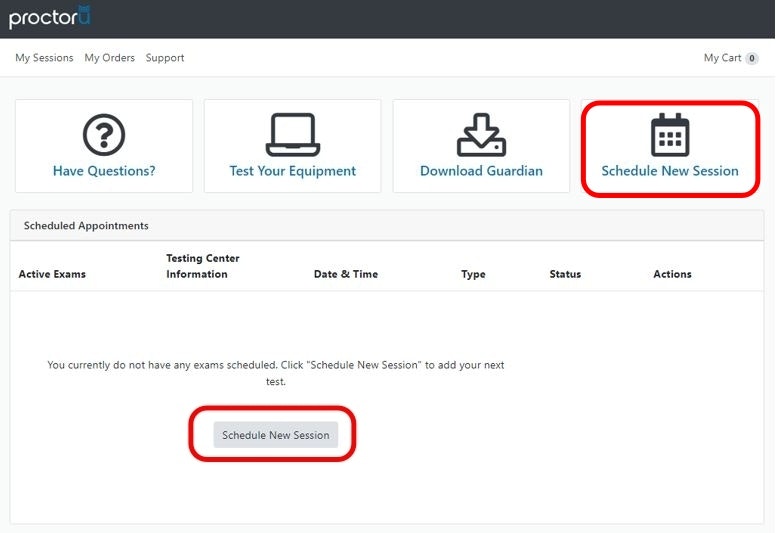
Log in to your ProctorU account and select Schedule New Session to begin scheduling your exam.
When scheduling, be sure to allocate 2.5 hours total to allow time for exam launch and completion.
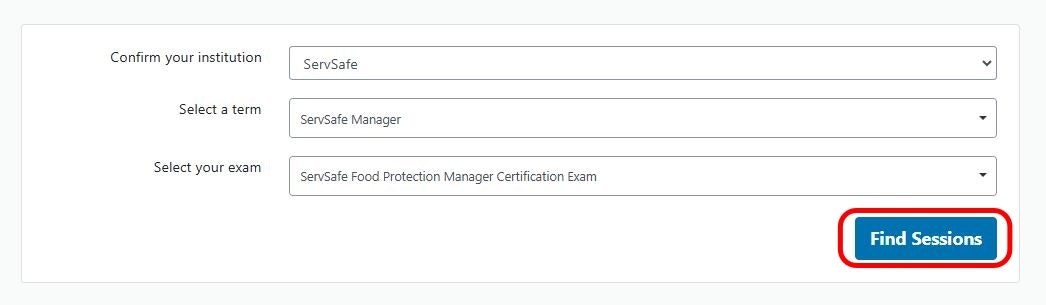
Confirm the following selections:
Institution: ServSafe
Term: ServSafe Manager
Exam: ServSafe Food Protection Manager Certification Exam
After confirming these selections, choose Find Sessions to continue.
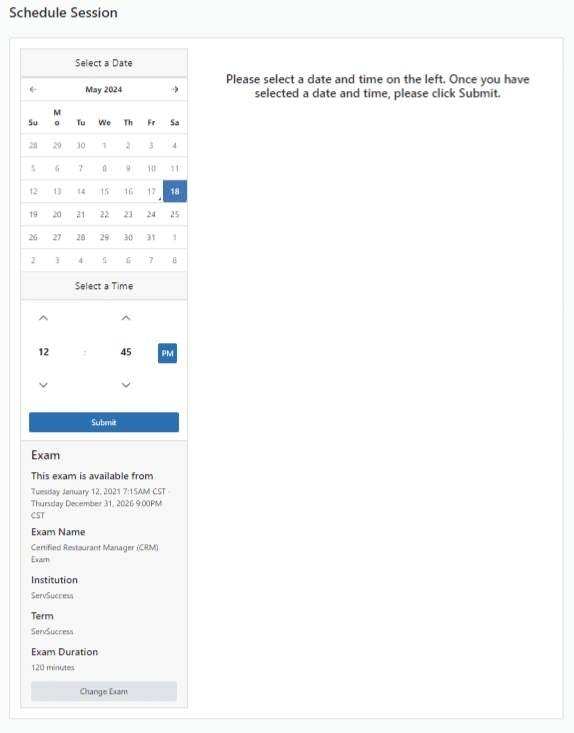
Available exam dates and times will appear on the screen.
Select a date and time that works for you
Click Submit to schedule your exam
Once scheduled, you will receive an email confirmation from ProctorU confirming the date and time of your exam.
Schedule early to ensure preferred dates and times are available
Changes or late scheduling may be subject to ProctorU fees
All scheduling and confirmation emails are handled by ProctorU, not Certivance