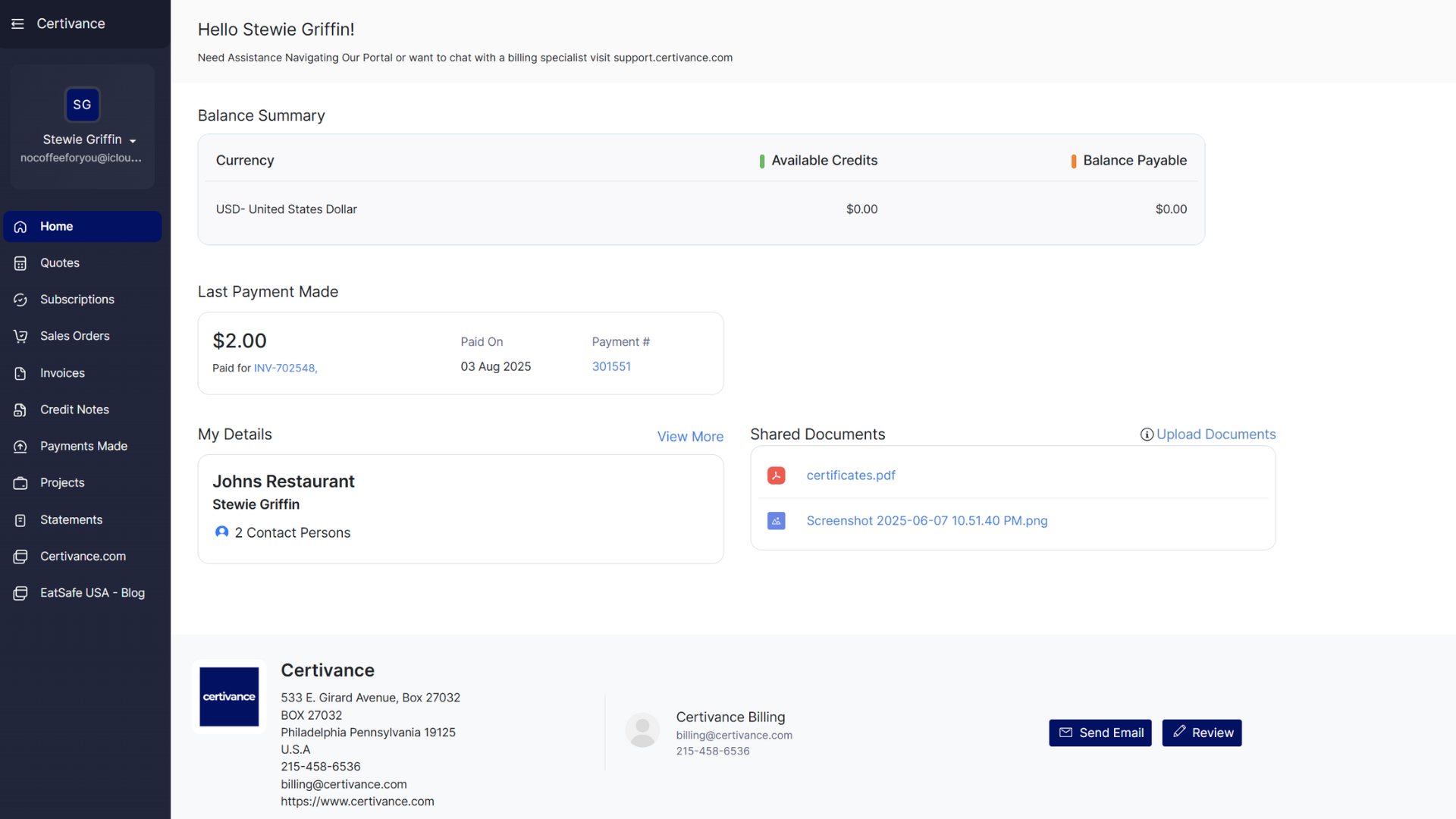
The sidebar within the Certivance Billing Portal is your primary navigation menu. From here, you can move between different sections of your account to view billing records, documents, and related account information.
Most sections are view-only and display records prepared by Certivance.
View proposals issued by Certivance. You can open a quote to review details and approve it when ready to proceed.
Displays any active subscriptions associated with your account. Subscriptions may include ongoing services such as compliance monitoring, recall alerts, or other recurring programs.
Approved quotes convert into sales orders. This section shows confirmed orders before they are invoiced.
Lists all invoices tied to your account. You can view invoice details, download PDF copies, and submit payments online when available.
Shows any credits issued to your account, such as adjustments or rescheduled services. Credits are automatically applied to future invoices.
A complete history of payments submitted on your account. Each entry includes the payment date, method (card or ACH), and amount. Receipts are available for download.
For consulting engagements, this section displays active projects. You may see progress updates, notes, and links to external collaboration tools when applicable.
Generate account statements summarizing invoices, credits, and payments over a selected period. Statements can be downloaded as PDFs for your records.
Access files uploaded by Certivance, which may include invoices, certificates, study materials, or compliance-related documents depending on your services.